Webpage to Markdown Chrome Extension
WebInk turns cluttered pages into clean, structured Markdown in one click — with auto TOC, templates, and one-click send to ChatGPT or Claude.
Explore HTML to Markdown features, real conversion examples, or try the free URL to Markdown tool.
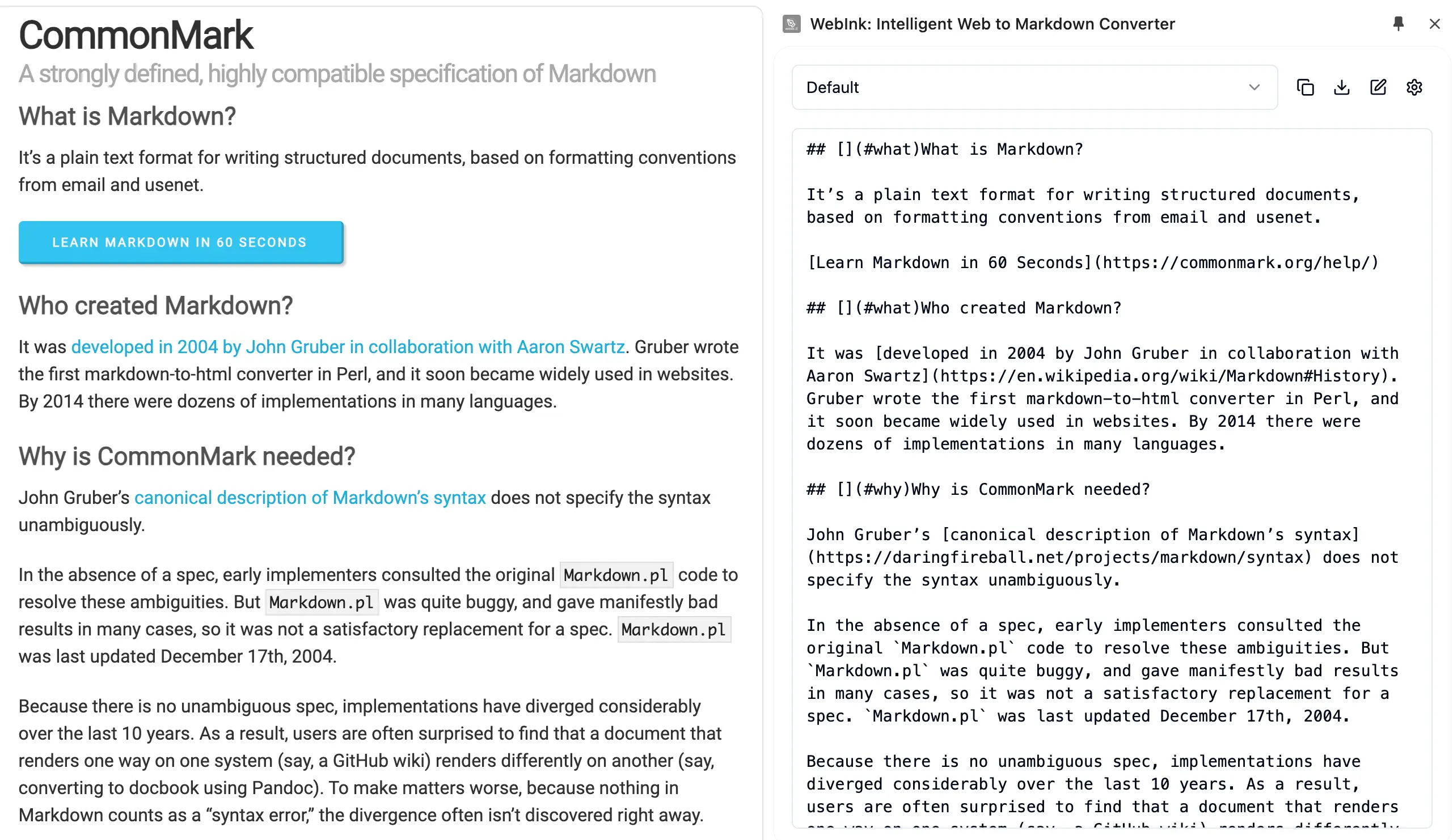
Built for how you actually work
Whether you're coding, researching, or prompting AI — WebInk gives you the clean content you need.
For Developers
Save documentation, blog posts, and Stack Overflow answers as Markdown for your knowledge base, Obsidian vault, or GitHub wiki.
For Researchers & Students
Collect articles, papers, and references into clean, structured notes. Add frontmatter metadata and organize your reading with templates.
For AI & LLM Users
Feed clean, well-structured content to ChatGPT, Claude, or any AI tool. Strip ads, navigation, and clutter — keep only what matters.
Three steps. That's it.
No setup, no configuration — just install and go.
Browse any web page
Navigate to the article, doc, or page you want to capture.
Click the WebInk icon
WebInk opens in the sidebar and intelligently extracts the main content.
Copy, download, or export
Get clean Markdown instantly. Copy it, download as .md, or export a ZIP with all images included.
Everything you need, nothing you don't
Six features. Zero configuration. Everything works out of the box. See all HTML to Markdown features.
Smart Conversion
Headings, tables, code blocks, links, images — all converted accurately, so you never lose formatting when moving content between tools.
TOC Navigation
Auto-generated table of contents with clickable navigation and real-time position tracking — jump straight to the section you need.
ZIP Export with Images
Download your Markdown bundled with all referenced images in a single ZIP file — fully offline-ready.
Custom Templates
Create reusable templates with variables like {{title}}, {{url}}, and {{publishedTime}} for consistent output every time.
One-Click Copy
Copy clean Markdown to your clipboard instantly. Paste it into Obsidian, Notion, GitHub, or your AI tool.
Works Everywhere
Optimized for Medium, MDN, Hacker News, Wikipedia, and thousands more. Strips ads, sidebars, and navigation — keeps only the article.
Go beyond conversion
WebInk's AI layer adds intelligence on top of raw conversion — so your content is not just clean, but ready to use.
Semantic Understanding
AI analyzes page structure to produce more accurate heading hierarchy and cleaner formatting — giving you Markdown that's ready to publish without manual editing.
Noise Removal
Intelligently strips ads, navigation, and sidebars — keeping only the content that matters for your notes or AI prompts.
# Understanding React Hooks
## useState — The Basics
React hooks let you use state and other features...
4.9
Chrome Web Store Rating
7,000+
Active Users
50,000+
Pages Converted